
Project Director is the strategic project & portfolio management platform. It gives you a rolling 12-month view of every person's allocation across every active project, so you spot over-commitment before it becomes burnout, and a resignation you didn't see coming.
Start your 14-day evaluation →The problems that land on your desk every week
“We just lost a key developer mid-project.”
You didn’t see it coming because no tool showed you they were stretched across six projects for three months straight.
“Can we take on this new project next month?”
You have no clear answer because your capacity data lives in spreadsheets that nobody keeps current.
“Why is the team behind? They look fully utilised.”
Because fully utilised and over-allocated are different things — and your current tools can’t tell them apart.
What changes
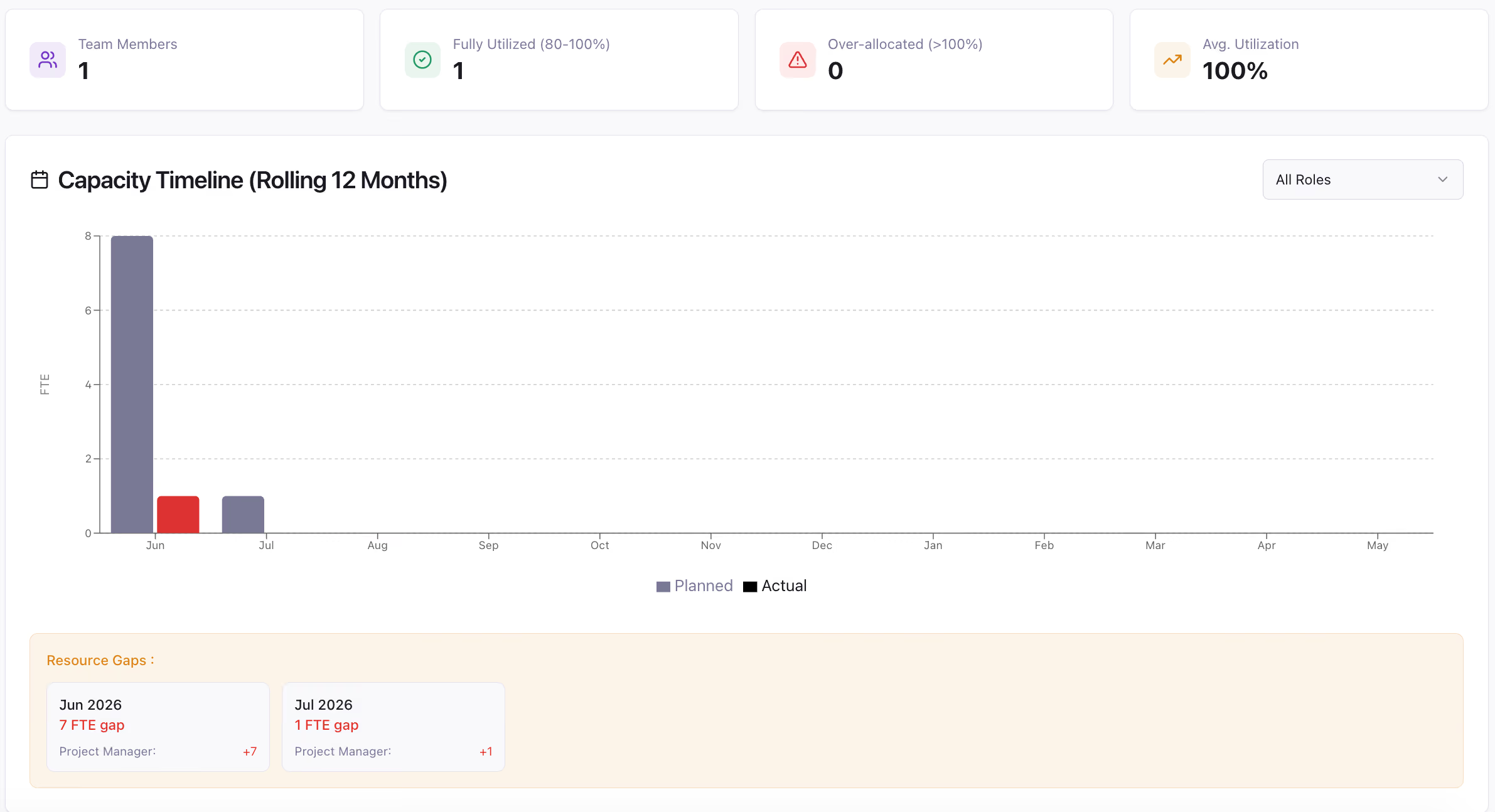
See exactly how every team member is allocated — across every active project — for the next 12 months. Filter by role. Spot constraints before they emerge. No more being blindsided by a crunch you could have seen coming in January.
Project Director shows you who is fully utilised, who is over-allocated, and by how much — in real time. You intervene before the burnout. Before the resignation. Before the project goes off track because the right person wasn’t available.
When a new project lands, you can see immediately whether your team has the capacity to absorb it — by role, by team, by timeline. Give leadership a real answer fast, backed by live data, not a guess.
Resource capacity view
How far ahead can we see capacity?
Twelve months, on a rolling timeline, filterable by role. You see where constraints will emerge rather than only where they already have, which is the difference between rescheduling work and losing someone.
Does it show allocation across every project, or one at a time?
Across every active project at once. That is the point. Individual projects each look reasonable in isolation; over-allocation only appears when you total a person's commitments across the whole portfolio.
How do we spot who is overloaded?
Summary metrics show total team members in scope, how many are fully utilised at 80 to 100 percent, how many are over-allocated above 100 percent, and average utilisation. The searchable allocation table then shows every assignment behind those numbers.
Can we model a change before committing to it?
Yes. Capacity is evaluated at portfolio level alongside budget, so you can test a different mix of projects and people and see both the financial and the resourcing effect before anything is approved.
Do the people we are tracking need their own seats?
Only people who log in need a seat. You can track allocation for team members without giving every one of them an account, and stakeholders invited as read-only viewers through a shared link do not count either.
What does it cost?
£15 per seat, per month, with a minimum of 10 seats, so £150 per month as a floor. Every feature is included at that price, and there is a free 14-day trial with no card required.
See your team’s real allocation. No spreadsheets, no guesswork.
